
Source Control
The Source Control pane on the left works like VS Code’s. It is shown when the terminal is at least 90 columns wide.
Stage and commit
Section titled “Stage and commit”- Press
c(or click the message box) and type the commit message.Alt+Enter,Shift+EnterorCtrl+Jstarts a new line. - Stage files:
Space,+or each row’s+button stages a file;-unstages it. A section header’s buttons act on every file in it. - Press
Enterin the message box, or click Commit, to commit what is staged.
In the file list:
Enter(or a click on the name) opens a file’s diff.o(or the header’s⧉) opens Open Changes: the diffs of every file in that section in one view.eopens the file in your editor ($VISUAL, then$EDITOR, thenvi).ddiscards a file’s changes, after asking.Escgoes back to the graph.
Repository menu
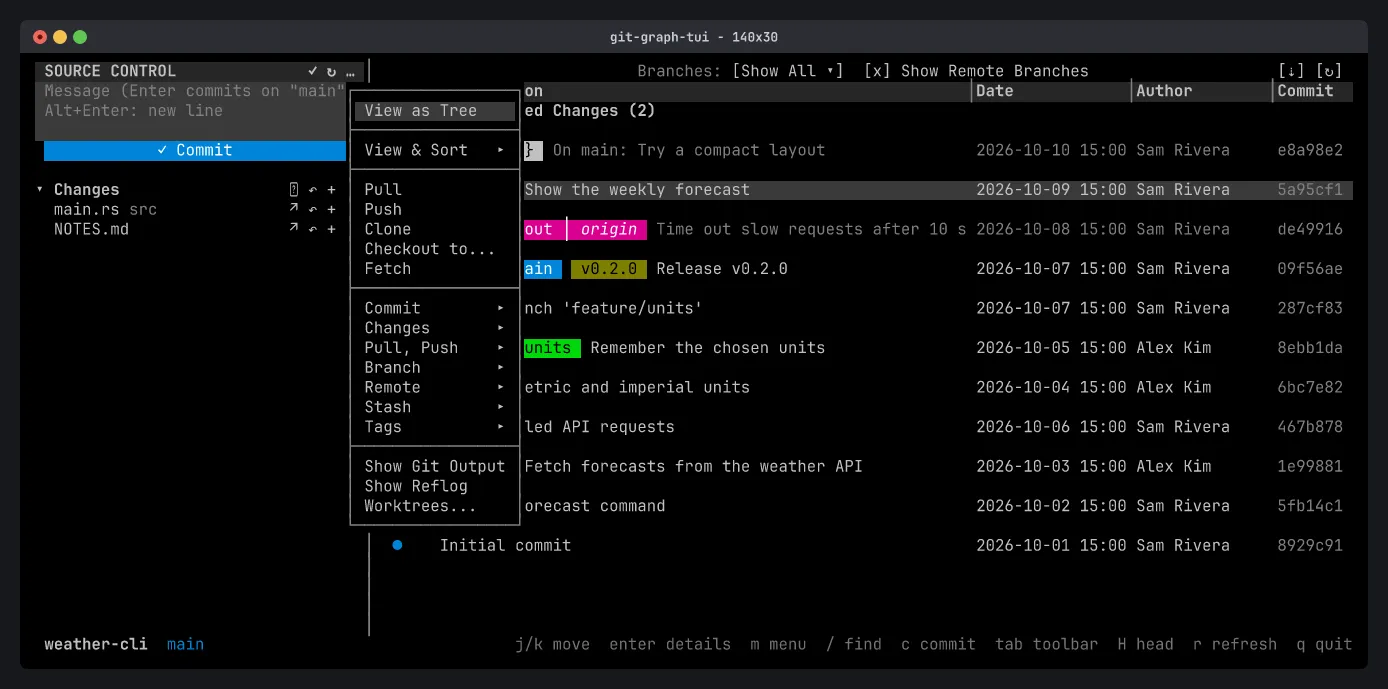
Section titled “Repository menu”The … button in the header (or m in the pane) opens the repository menu:
- View as Tree / View & Sort: how the changed files are listed.
- Pull, Push, Clone, Checkout to…, Fetch.
- Submenus for Commit (amend, sign-off), Changes, Pull, Push, Branch, Remote, Stash and Tags.
- Show Git Output: the commands git-graph-tui ran and their output.
- Show Reflog: where HEAD has been, to recover a commit a reset left behind.
- Worktrees…: list, add, lock and remove worktrees.
When the pane is hidden, the same menu is the [...] button in the toolbar.